Features
Keep personal data out of ChatGPT, Copilot and Claude
Two parts, working together. The browser extension looks after your team the moment they hit send. The console is where you set the rules and keep the records someone will one day ask to see.
Swap and restore
Personal data is swapped before the prompt is sent
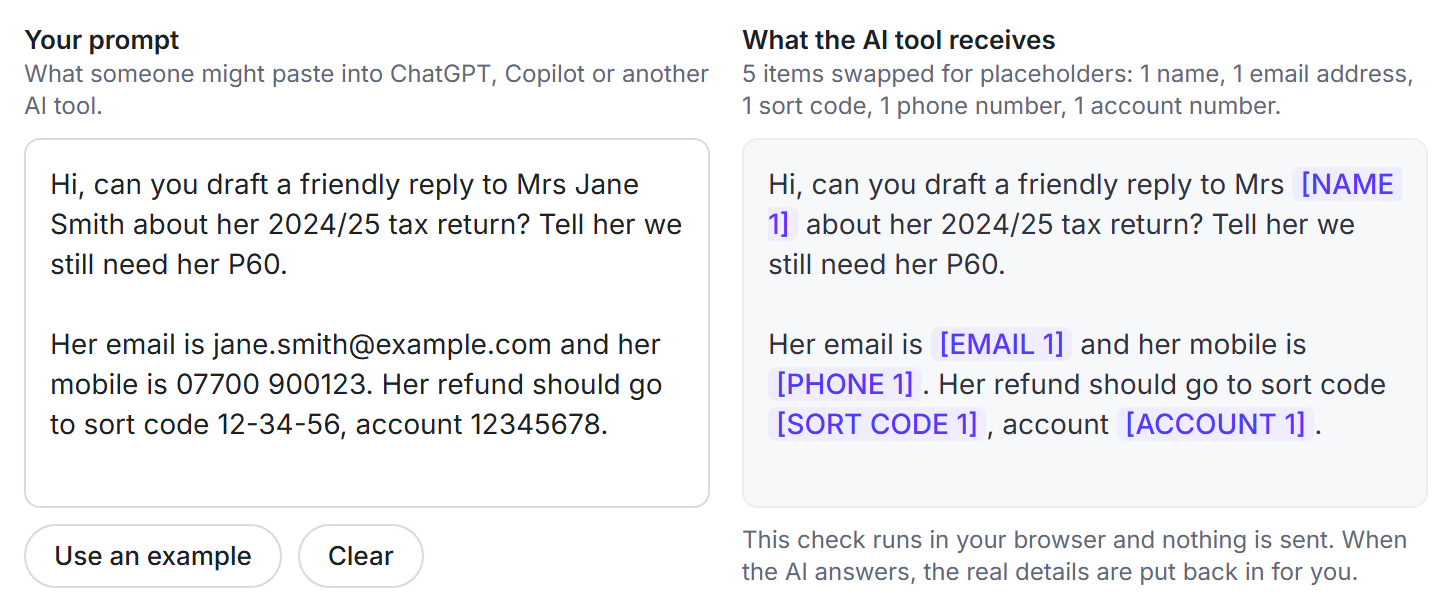
Whatever your team types or pastes into ChatGPT, Microsoft Copilot, Claude, Gemini or Perplexity gets checked first. Names, emails, phone numbers, National Insurance numbers and bank details are swapped for placeholders like [PERSON_1]. When the answer comes back, we put the real details back in on your screen, so it reads just as you'd expect.
- It all happens on your own computer. We never see what you type.
- Passwords, API keys and private keys are always blocked. There's never a good reason to paste them into AI.
- File cleaning takes personal details out of CSV and Excel files before they're uploadedTeam plan
Approved AI tools
Decide which AI tools your team can use
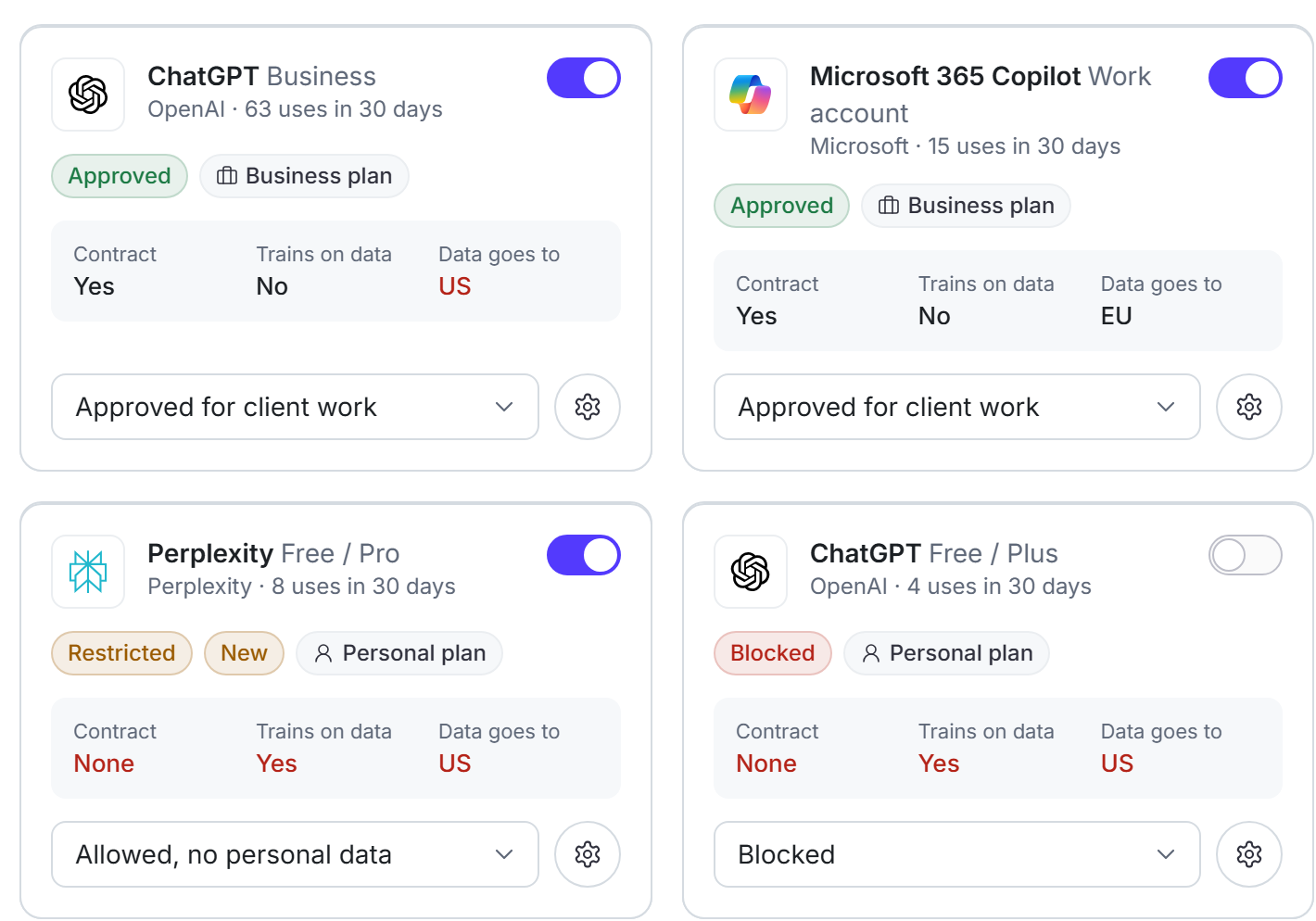
See every AI tool your team uses, including the ones you didn't know about (sometimes called shadow AI).
Free and business plans of the same AI tool can be worlds apart. So we show each one separately: is there a contract with your firm, does it learn from what you type, and where does your data go? Then you decide. Approve the business plans you pay for, allow personal accounts for work with no personal data, or block them.
- Four access levels: approved for client work, allowed with no personal data, under review and blocked.
- If someone starts using a new AI tool, you'll know. No more shadow AI.
- Set what can go where for each type of data, from names to the most sensitive kinds, such as health, religion or ethnicity (special category data).
Detection
Detection built for UK data
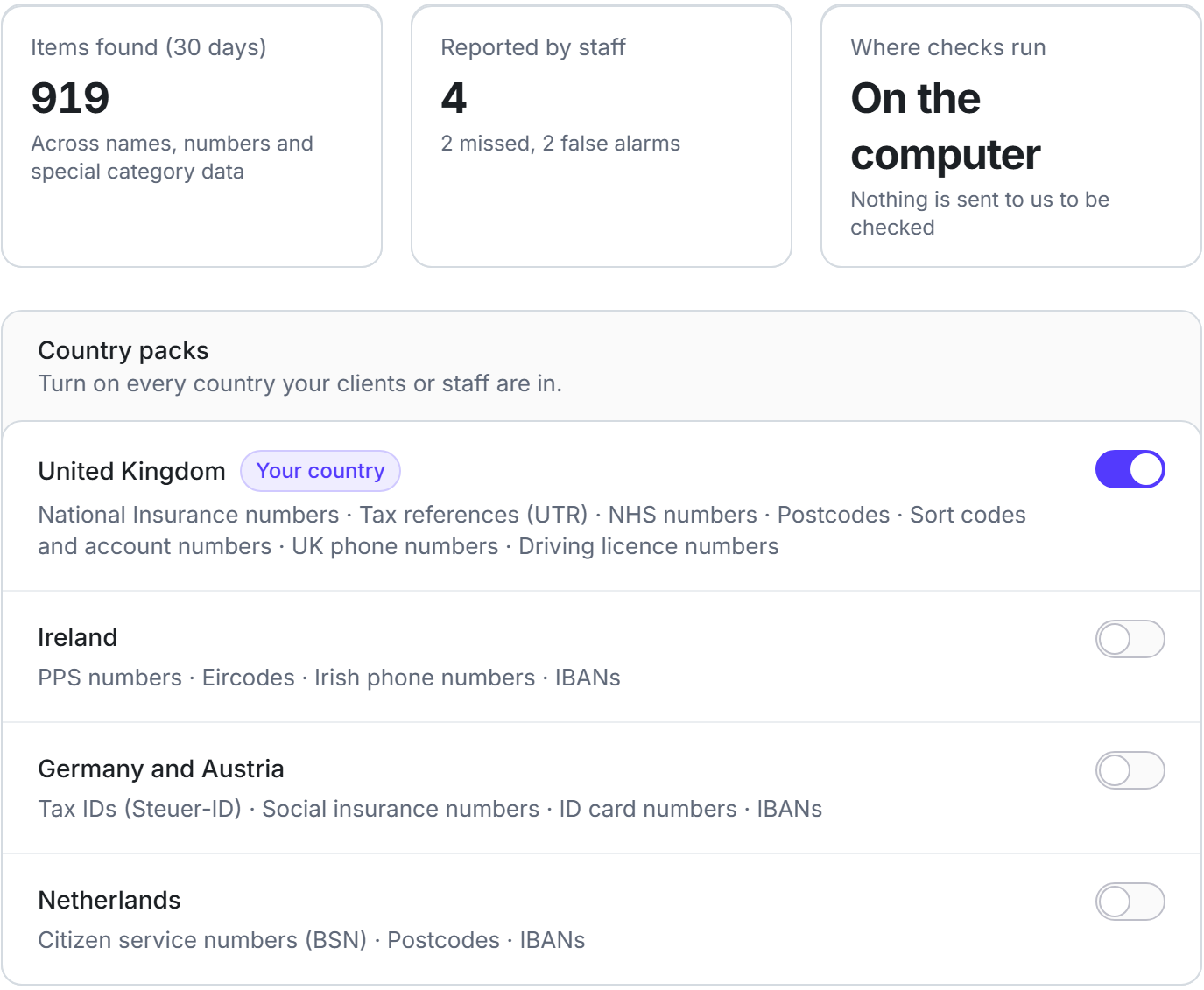
Saiela is built for UK data. It spots names, National Insurance numbers, tax references, NHS numbers, postcodes, sort codes and account numbers, UK phone numbers and driving licence numbers. Add packs for other countries your clients are in, and for the way your industry writes.
- Country packs for Ireland, Germany and Austria, and the NetherlandsTeam plan
- Industry packs for accounting, law and general businessTeam plan
- Add your own lists, so it always catches your client names and reference codes, and leaves your own firm's name aloneTeam plan
Activity
See how AI is really used across the firm
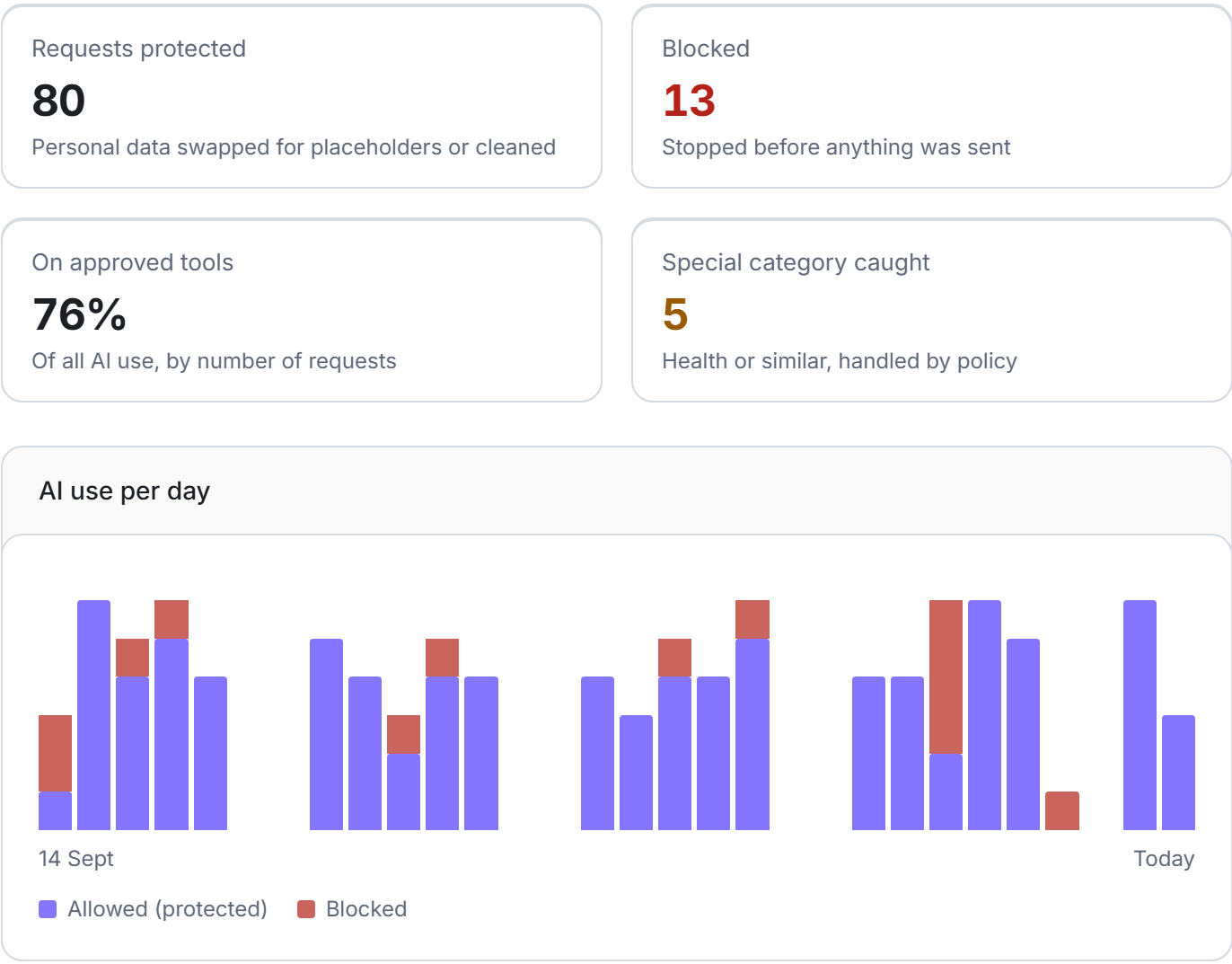
See how much your team uses AI, how often personal data was protected or stopped, how much of it happens on tools you've approved, and where the most sensitive data turned up. Break it down by tool or by team to see where the risk is.
- Counts of events, never the content of what anyone typed.
- Teams of fewer than four people are grouped together, so no one gets singled out.
- Export the figures as a spreadsheet when you need them.
Alerts
Alerts when something needs you
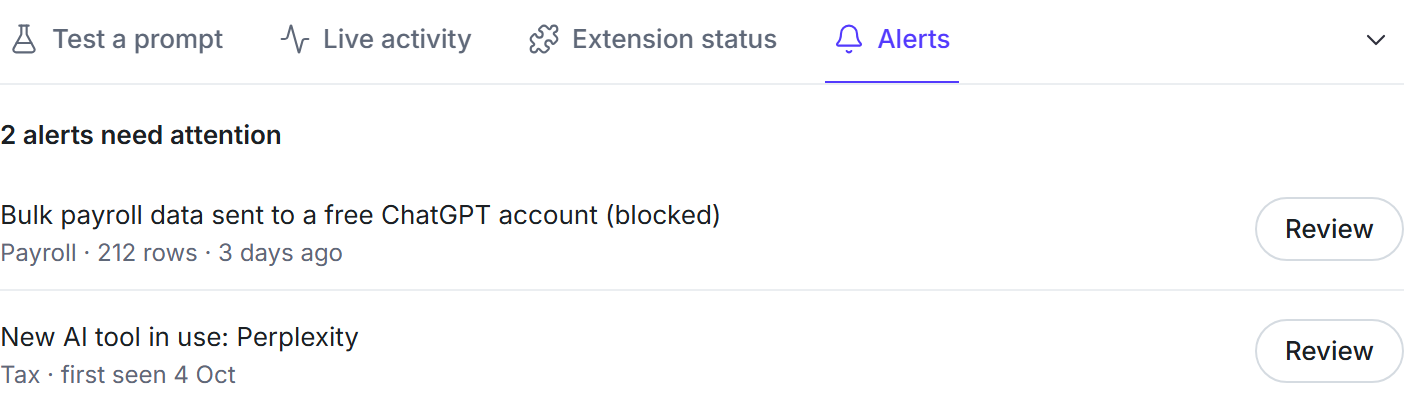
No need to keep checking. We'll tell you when something needs you: a possible breach to look at, a new AI tool turning up in a team, or a document that's due a review.
- Possible breaches flagged as soon as they happen, such as client data sent to a free AI account, with the 72-hour reporting deadline in view.
- New AI tools and unusual use, such as a jump in an unapproved tool in one team.
- See every alert in the console, or get them in Microsoft Teams or SlackTeam plan
Audit log
A record of every AI use, never the content
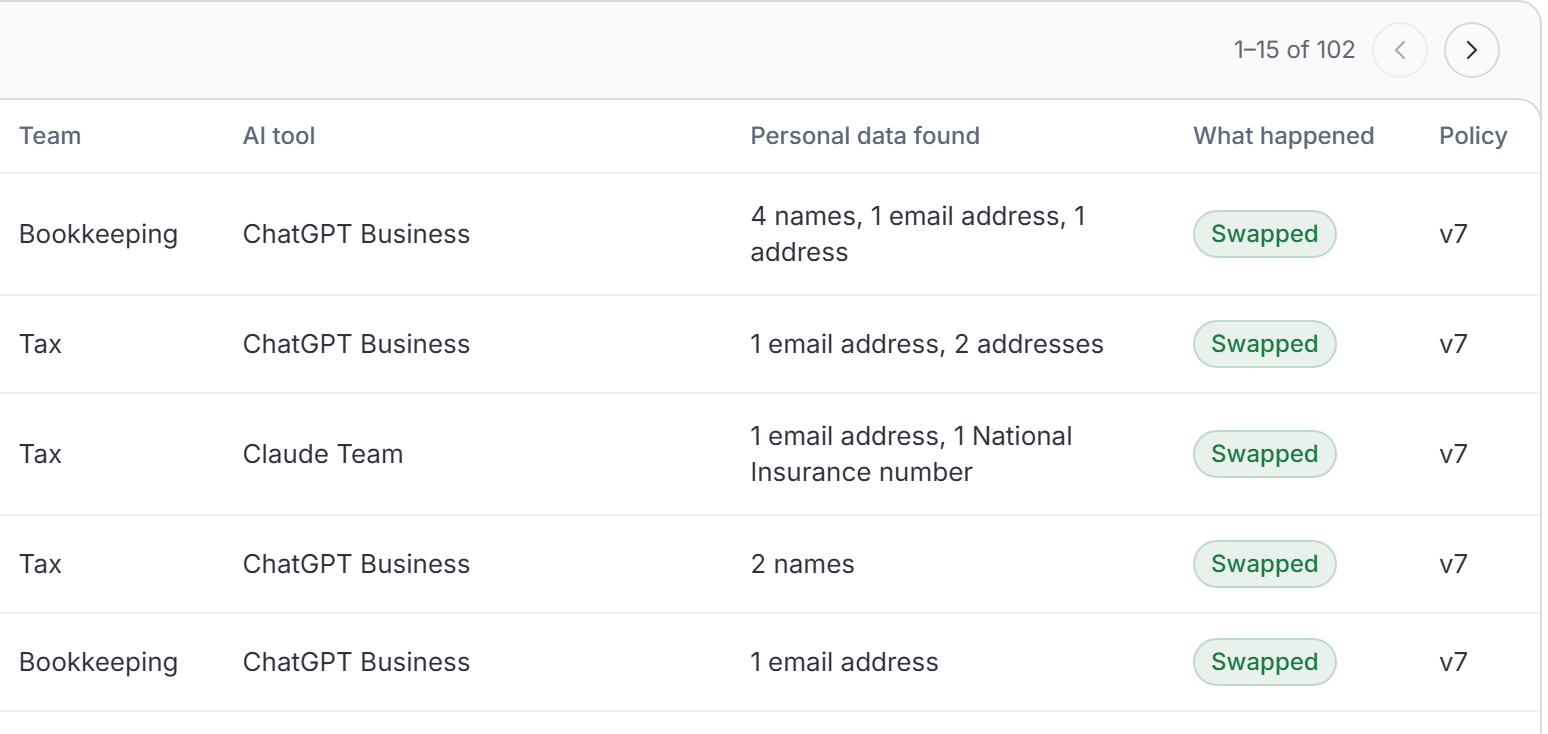
The audit log records what happened, never what anyone wrote: what kind of data was found, which AI tool it was heading for, and what we did about it. People show as IDs, not names. If an admin needs to see who someone is, they have to give a reason, and that's logged too.
- Each entry is locked to the one before it, so you can check in one click that nothing has been changed.
- Keep it for 30 days on Free, or up to 36 months with export on Team.
- Find any event by tool, team, action or date.
Compliance centre
The GDPR paperwork, written from how you work
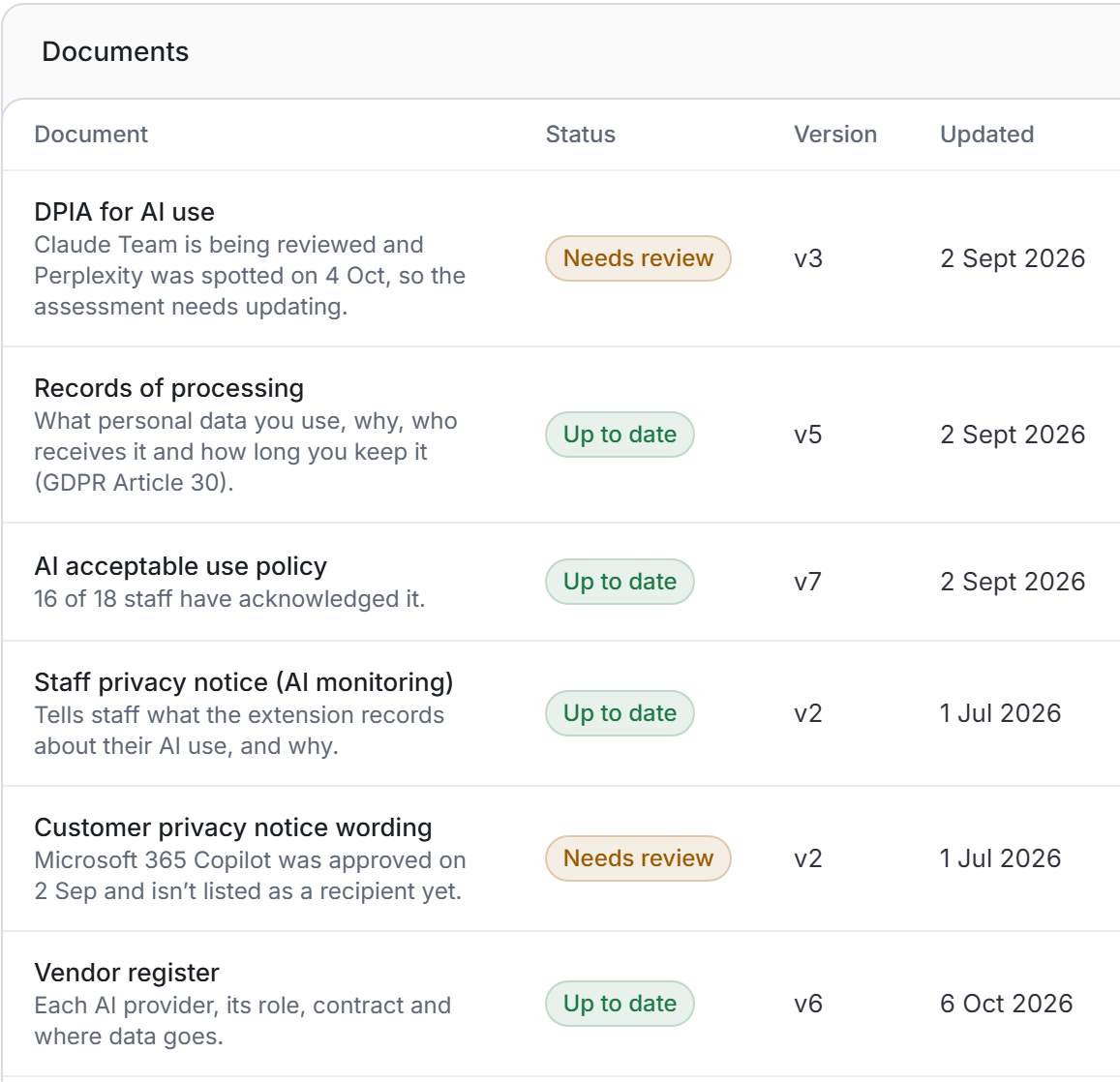
Saiela drafts the documents a regulator, insurer or client will ask for, from what the console already knows: which tools you approved, what data your team handles and what your policy says. When something changes, such as a new AI tool being approved, the affected document is flagged for review.
- DPIA (a written check of the risks and how you reduce them), records of processing, AI acceptable use policy, staff and customer privacy notice wording, vendor register and transfer risk assessment (a check that data sent abroad is still protected).
- Sign-off and version history for each documentTeam plan
- Export one evidence pack, a PDF and a spreadsheet, to send when someone asks how you use AITeam plan
And the rest of what a careful firm needs
The smaller things that make AI use something you can stand behind.
Breach register
Record near misses and breaches in one place. If one has to be reported to the Information Commission (ICO), you'll see the 72-hour deadline. Free on every plan.
Policies staff acknowledge
Publish your AI policy to everyone, ask each person to sign it and keep the version history.Team plan
Staff AI lessons
Four short lessons, each a few screens and one question, with examples from your industry. You'll have a record of who's done them.
Report-only mode
See how AI is really used before you switch protection on for everyone, so your rules fit how people work.Team plan
Monthly reports
A one-page report for owners and partners, emailed to you every month.Team plan
Integrations and single sign-on
Bring your team in from Microsoft or Google, install the extension for everyone with Intune, Google Admin or Jamf, and send alerts to Teams or Slack.Team plan
Roles and auditor access
Invite colleagues with the right role, and give an auditor, insurer or outside data protection adviser read-only access for a set time.Team plan
Trust badge
Show clients your AI use is protected, with a badge for your website that links to a public page listing your AI policy, approved tools and protections.Team plan
Go deeper: whether your AI tool is safe for client data, free templates, and how Saiela works for your line of work.
Ready? Install Saiela
Questions
What people ask about how Saiela works.
Which AI tools does Saiela work with?
ChatGPT, Microsoft Copilot, Claude, Gemini and Perplexity, used in the Chrome or Edge browser. Saiela also spots other AI tools when your team starts using them, so you can review them.
Does Saiela see what my team types?
No. Every check runs on the person's own computer, and we never see the text. The audit log records only what kind of personal data was found, which tool it was heading for and what happened.
What happens if the extension can't check a page?
You choose. The recommended setting pauses sending on that page until it can be checked. The alternative warns the person and lets them send after they confirm.
Are the GDPR documents legal advice?
No. Saiela drafts them from how your team actually uses AI and flags them when something changes, but you should review each one before relying on it.
Seen enough? Try it on your own team.
7 days of every Team feature, free. No per-seat maths.