UK GDPR for AI at work
Let AI in. Keep personal data out.
Saiela keeps client details out of ChatGPT, Copilot and Claude. It swaps sensitive details in prompts and files for placeholders before anything is sent, then puts them back in the answer. You get a clear view of your team's AI use, early warnings, and the records to prove it.
A short animated tour of Saiela. First, an admin approves the AI tools the team already uses, and staff see a warning on a personal account. Next, someone types a prompt with a client's name, email and bank details; Saiela swaps them for placeholders before the prompt is sent, and puts the real details back in the answer. Last, the dashboard shows a metadata-only audit log and the GDPR documents, ready as an evidence pack.
 Saiela on
Works in the browser with
 ChatGPT
 Microsoft Copilot
 Claude
 Gemini
 Perplexity
- UK data regionOn every plan
- Never sees your promptsThe check happens on your computer
- UK GDPR paperwork includedDPIA, records, AI policy, breach register
- Independent UK companySimpleKPI Ltd, London, since 2007
Protection that doesn't get in the way
Your team probably pastes emails, spreadsheets and client notes into AI every day. That's fine. Saiela just catches the personal details before they leave the computer, and nobody has to change how they work.
 01
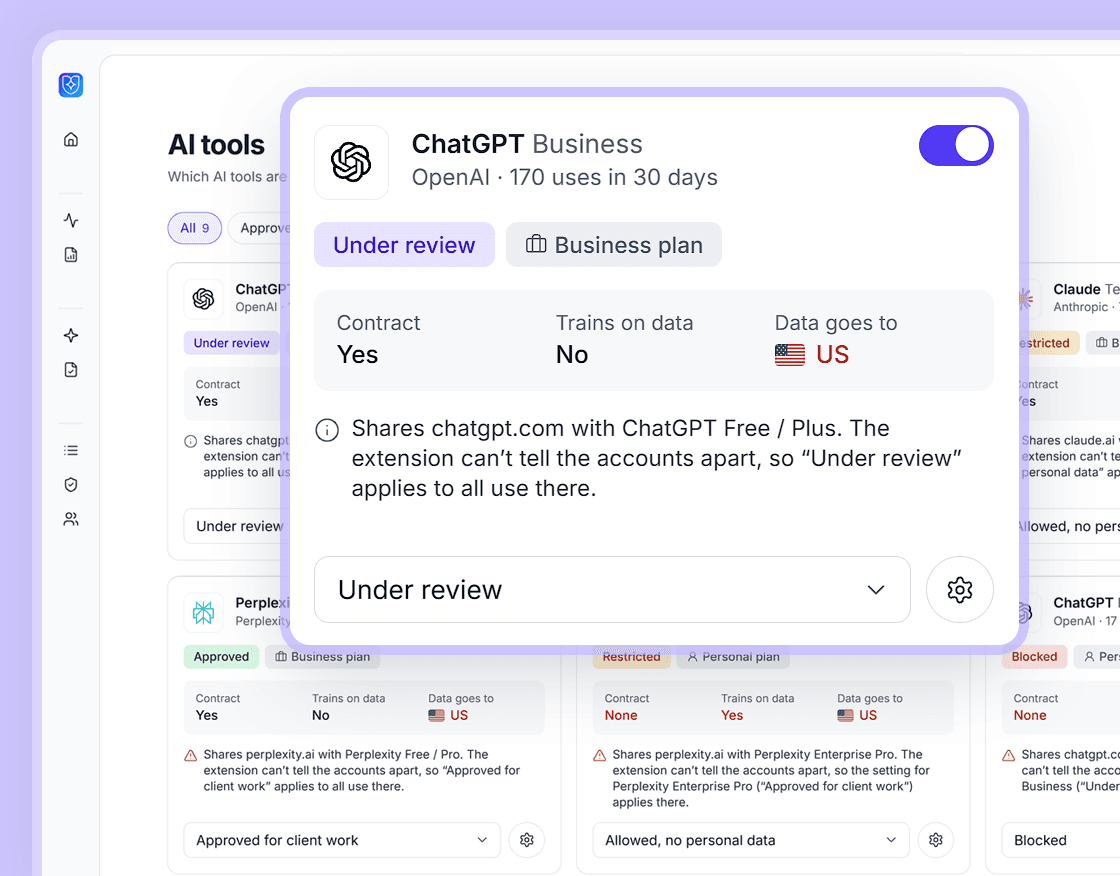
01Add the browser extension
Add it to your team's browsers. Then choose which AI tools are OK to use, and what kind of data can go where.
![Saiela's Test a prompt screen: a referral letter prompt, and what the AI tool receives, with the name, email, mobile, address, postcode, National Insurance number, date of birth, sort code and account number each replaced with a placeholder such as [PERSON_1] or [EMAIL_1].](/_astro/personal-data-swapped.2DXb7qJg_Z1nOTiG.png) 02
02Personal details are swapped out as they type
Names, emails, phone numbers and bank details turn into placeholders before anything is sent. When the answer comes back, the real details are back in place.
 03
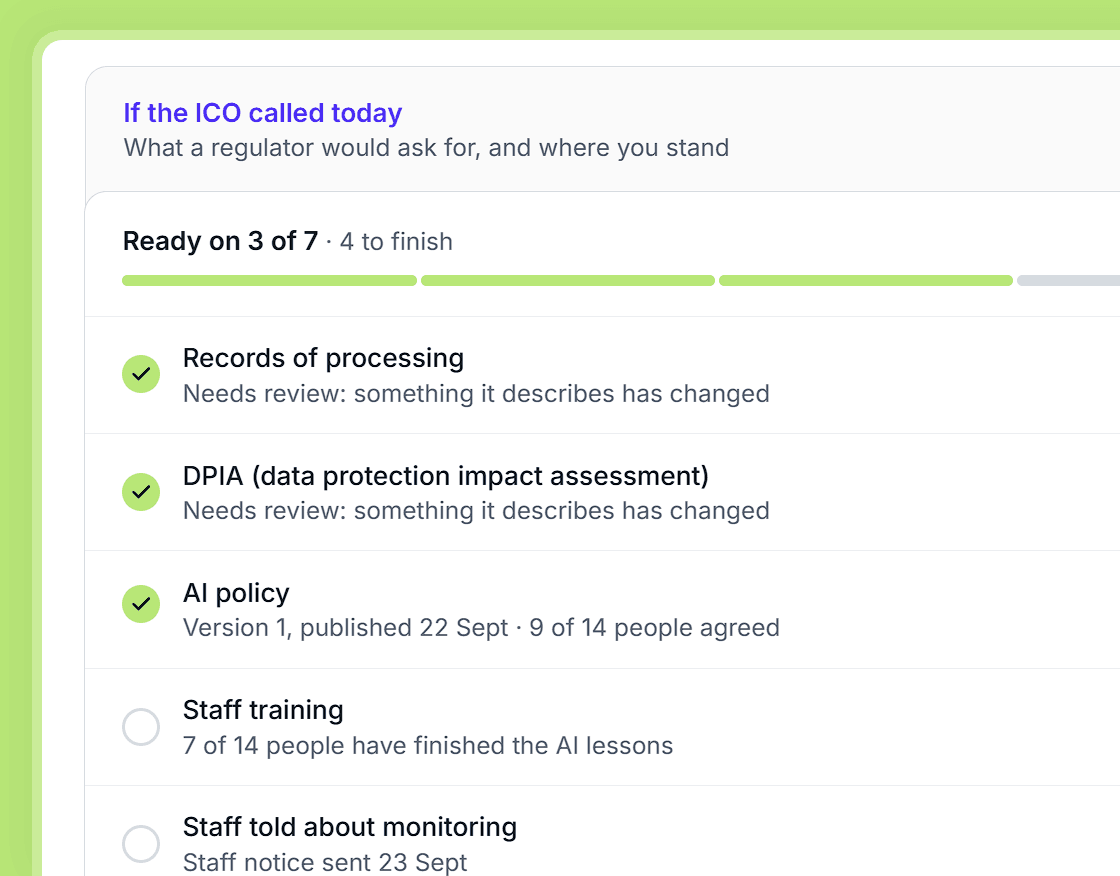
03You keep the proof
You'll see how your firm really uses AI. And you'll have a log and the GDPR paperwork to show your rules were followed.
See it, prove it
Get a grip on how your firm uses AI
Most firms have no idea which AI tools their team uses, or what goes into them. Saiela shows you in simple numbers, and turns it into the documents you'll be asked for.
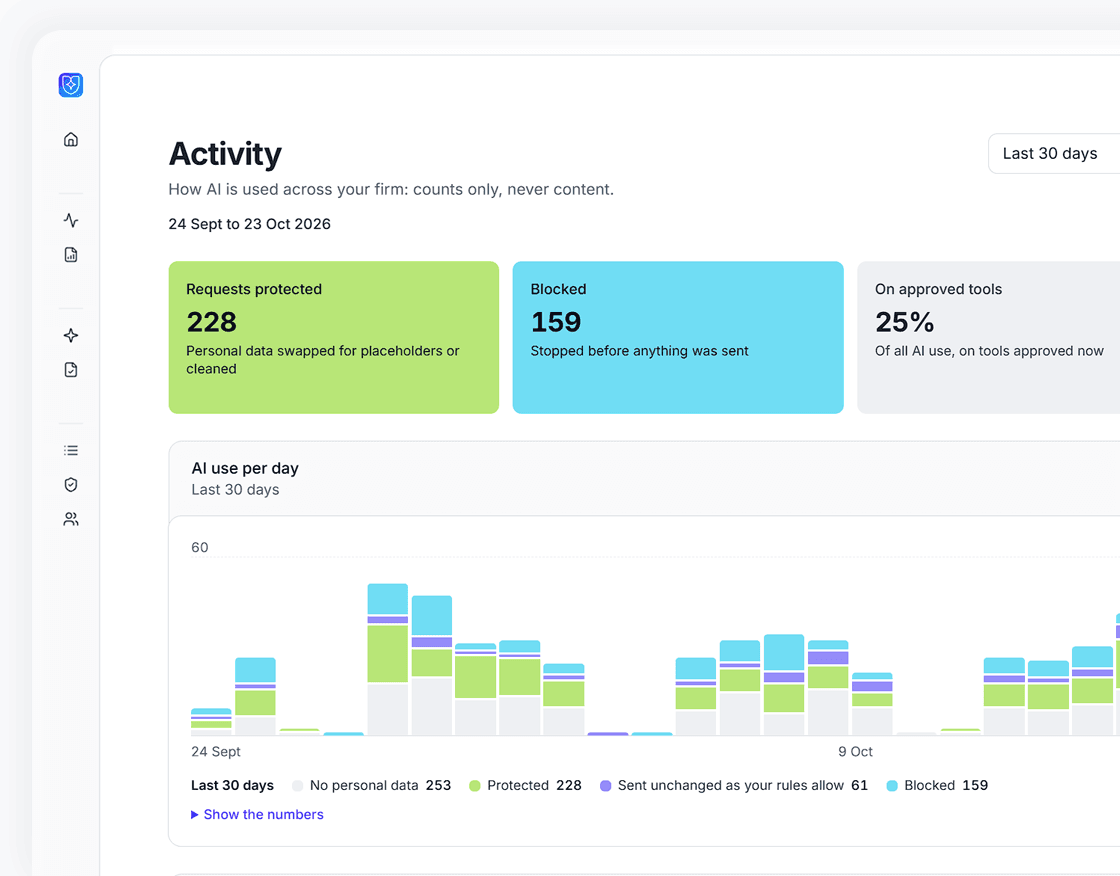
Statistics on every AI tool and team
See which AI tools get used, how often and by which teams. See how much personal data was protected, and what was stopped before it went anywhere.
- Prompts protected and blocked, and the share of AI use on approved tools
- Use broken down by tool and by team, with small teams combined
- Spot AI tools you didn't know your team was using
- Counts of events, never the content of what anyone typed
- A one-page monthly report for owners and partnersTeam plan
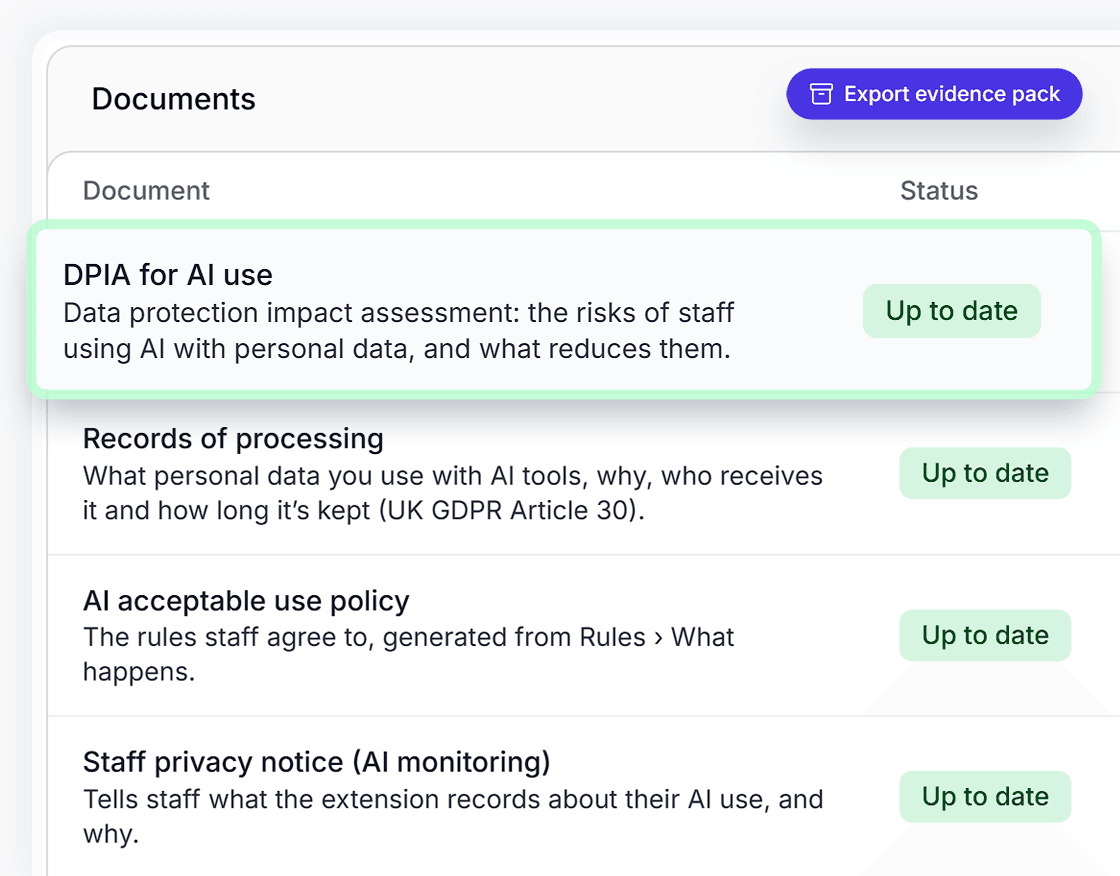
GDPR documents, drafted for you
We draft your GDPR paperwork for you: the risk assessment (DPIA), your records, your AI policy and a list of the AI tools you use. It's based on how your team really works, it tells you when something needs updating, and it's ready when someone asks.
- Written from your settings, tools and usage, not a blank template
- Flagged for review when you approve a new tool or change a rule
- Sign-off and version history for each documentTeam plan
- One evidence pack to send to the ICO, an insurer or a clientTeam plan
Everything you need to show AI is used safely
The extension looks after your team the moment they hit send. The console is where you set the rules, and keep the records an auditor or insurer will want to see.
Swap and restore
Personal details are swapped out before they reach the AI. The answer still reads naturally, because we put them back when it arrives.
Approved AI tools
See, for each AI tool and plan, whether there's a contract and whether it trains on what you type. Approve the business plans you pay for, and warn about or block personal accounts.
A record of every AI use, never the content
It logs what happened, never what anyone wrote. People show as IDs, not names, and you can check nobody has changed it.
The GDPR paperwork, done
A risk assessment (a DPIA), your records, an AI policy and a list of the AI tools you use, filled in from how your team really works.
Alerts and breach register
We'll tell you straight away about a possible breach or a new AI tool, in the console or, on Team, in Teams and Slack. If you need to report something, you'll see the 72-hour ICO deadline. The breach register is free on every plan.
Staff AI training records
Short lessons for your team and a record of who's done them, so you can show your team knows the rules when the ICO, a client or your insurer asks.
One price for the whole team
No per-seat maths. Every new account starts with a 7-day Team trial, and if you don't upgrade you move to Free with nothing deleted.
UK data region on every plan
Free
For one person trying AI safely.
£0forever
Prices in pounds sterling, plus VAT.
- One person, one browser
- Swap and restore for 25 prompts a month
- Warnings and blocking that never switch off
- Allow or block each AI tool
- AI policy, vendor register and breach register
- UK data region
UK data region on every plan
Team
Every featureFor your whole organisation, however many people.
£49a month plus VAT
Or £470.40 a year, 20% off when you pay yearly.
Prices in pounds sterling, plus VAT.
- Everyone in your organisation
- Unlimited swap and restore, plus file cleaning
- Team rules, access levels and report-only mode
- Audit log for up to 36 months, with export
- DPIA, records of processing and evidence pack
- Monthly reports, single sign-on and 24/7 support
Made for UK firms that hold client data
Saiela knows the numbers, documents and rules that matter in your line of work.
For accountants and bookkeepers
Use AI on client work without exposing client data
A reminder about a tax return pulls in the client's name, email address and UTR before anyone notices.
For solicitors and law firms
Use AI in your firm without breaking client confidence
Summarising a client's letter sends their name, address and matter number along with it.
For estate and letting agents
Use AI at your agency without sending tenants' details to it
An arrears letter or a renewal email carries the tenant's name, address and sometimes their bank details.
For SMEs and small businesses
Use AI across your business without leaking customer data
Asking AI to draft a reply sends the customer's name, address and order details with it.
Questions
The things owners and office managers ask first.
Does Saiela stop my team using AI?
No, quite the opposite. Your team keeps using the AI tools you approve. We just swap names, emails, account numbers and other personal details for placeholders before anything is sent, and put them back in the answer. You decide which tools are approved, and whether personal accounts are blocked or just get a warning.
Can Saiela read our prompts?
No. The swap happens on each person's own computer, so we never see what they type or what the AI says back. The log only records things like which tool was used, what kind of data was found and what happened to it.
Can Saiela show which AI tools my team uses?
Yes. You'll see every AI tool your team uses in the browser, including new ones as they turn up, and whether people are on a business plan or a personal account. Some people call this shadow AI. You decide what's approved, what gets a warning and what's blocked.
Which AI tools does it work with?
ChatGPT, Microsoft Copilot, Claude, Gemini and Perplexity in Chrome and Edge, with more tools in our library. The extension only works in the browser. If your team uses AI desktop apps, Saiela can still report them through device management tools such as Intune or Jamf.
What paperwork does Saiela produce?
Every plan includes an AI policy, a list of the AI tools you use (a vendor register) and a breach register, because UK GDPR requires every breach to be recorded. Team adds a risk assessment (a DPIA), records of processing, staff AI training records, a monthly report and one evidence pack you can send to your data protection lead, an auditor or your insurer.
Where is our data stored?
In a UK data region. Every Saiela account uses it, on every plan.
How much does it cost?
Free covers one person and 25 protected prompts a month; warnings and blocking carry on after that. Team is £49 a month plus VAT for your whole organisation, however many people you have, or 20% off paid yearly. Every new account starts with a 7-day Team trial.
Let your team use AI. Keep the proof.
Try every Team feature free for 7 days.